


后台自定义CSS代码即可
第一种CSS
.meta-pay.but.jb-yellow {--this-bg: linear-gradient(43deg, #ff6ac34a 0%, #82e1ff 46%, #ff6ac34a 100%);}第二种CSS
.meta-pay.but.jb-yellow {--this-bg:linear-gradient(135deg,#ec28ff 10%,#289fff 100%);}其它CSS自己添加测试
/* 流动渐变背景按钮 */
.meta-pay.but.jb-yellow,
.meta-pay.but[class*="jb-vip"] {
    background: linear-gradient(90deg, #ff0080, #ff8c00, #4caf50, #2196f3, #9c27b0);
    background-size: 300% 100%;
    color: white !important;
    animation: gradient-flow 5s ease infinite;
    border: none;
    font-weight: bold;
    text-shadow: 0 1px 3px rgba(0,0,0,0.3);
}

@keyframes gradient-flow {
    0% { background-position: 0% 50%; }
    100% { background-position: 100% 50%; }
}

/* 炫彩 - 免费资源按钮 */
.meta-pay.but.jb-yellow,
.meta-pay.but.jb-yellow:hover {
    background: linear-gradient(45deg, #ff0080, #ff8c00, #ffeb3b, #4caf50, #2196f3, #9c27b0);
    background-size: 400% 400%;
    color: transparent !important;
    background-clip: text;
    -webkit-background-clip: text;
    animation: zib-color-shift 8s ease infinite;
    border: none;
    text-shadow: none;
    font-weight: bold;
}

/* 炫彩 - 会员专属按钮 */
.meta-pay.but[class*="jb-vip"],
.meta-pay.but[class*="jb-vip"]:hover {
    background: linear-gradient(45deg, #e91e63, #9c27b0, #2196f3, #00bcd4, #4caf50, #ffeb3b);
    background-size: 400% 400%;
    color: transparent !important;
    background-clip: text;
    -webkit-background-clip: text;
    animation: zib-color-shift 6s ease infinite;
    border: none;
    text-shadow: none;
    font-weight: bold;
}

/* 动画:颜色流动 */
@keyframes zib-color-shift {
    0% {
        background-position: 0% 50%;
    }
    50% {
        background-position: 100% 50%;
    }
    100% {
        background-position: 0% 50%;
    }
}

/* 可选:增加光晕效果 */
.meta-pay.but[class*="jb-"],
.meta-pay.but[class*="jb-"]:hover {
    text-shadow:
        0 0 8px rgba(255, 255, 255, 0.3),
        0 0 16px var(--primary-color, #00aaff);
    transition: all 0.3s ease;
}
附修改:免费、 积分、 付费资源教程 图标采取 Font Awesome 4 改自己喜欢的图标
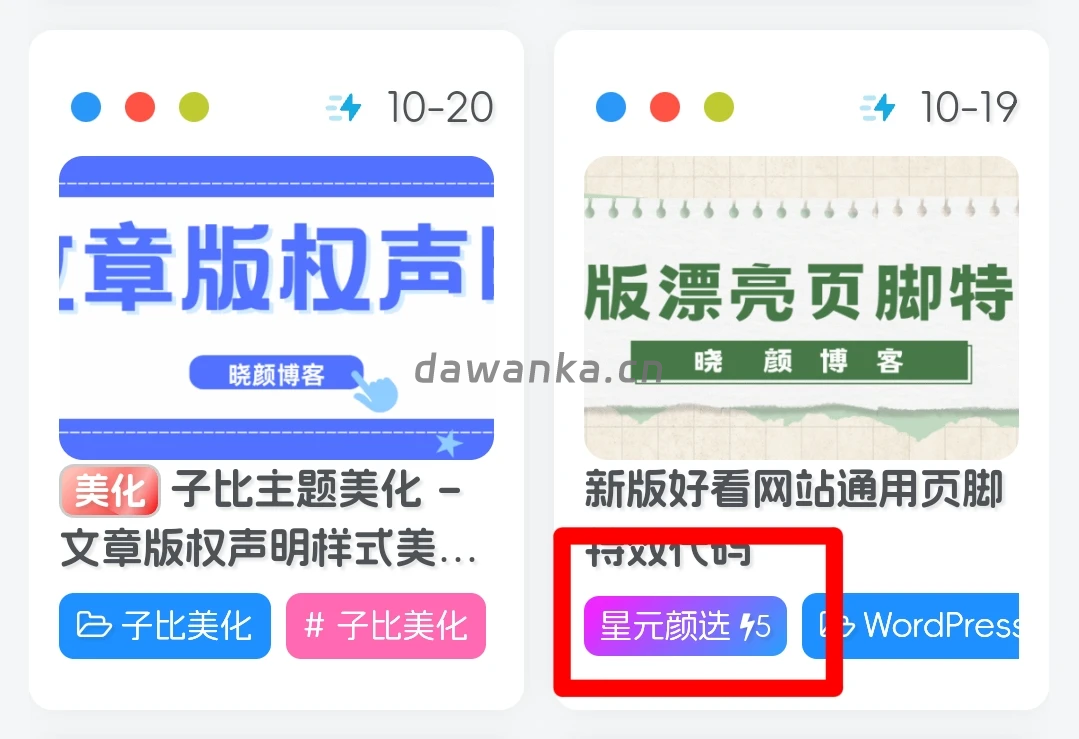
效果图片展示:
部署教程:
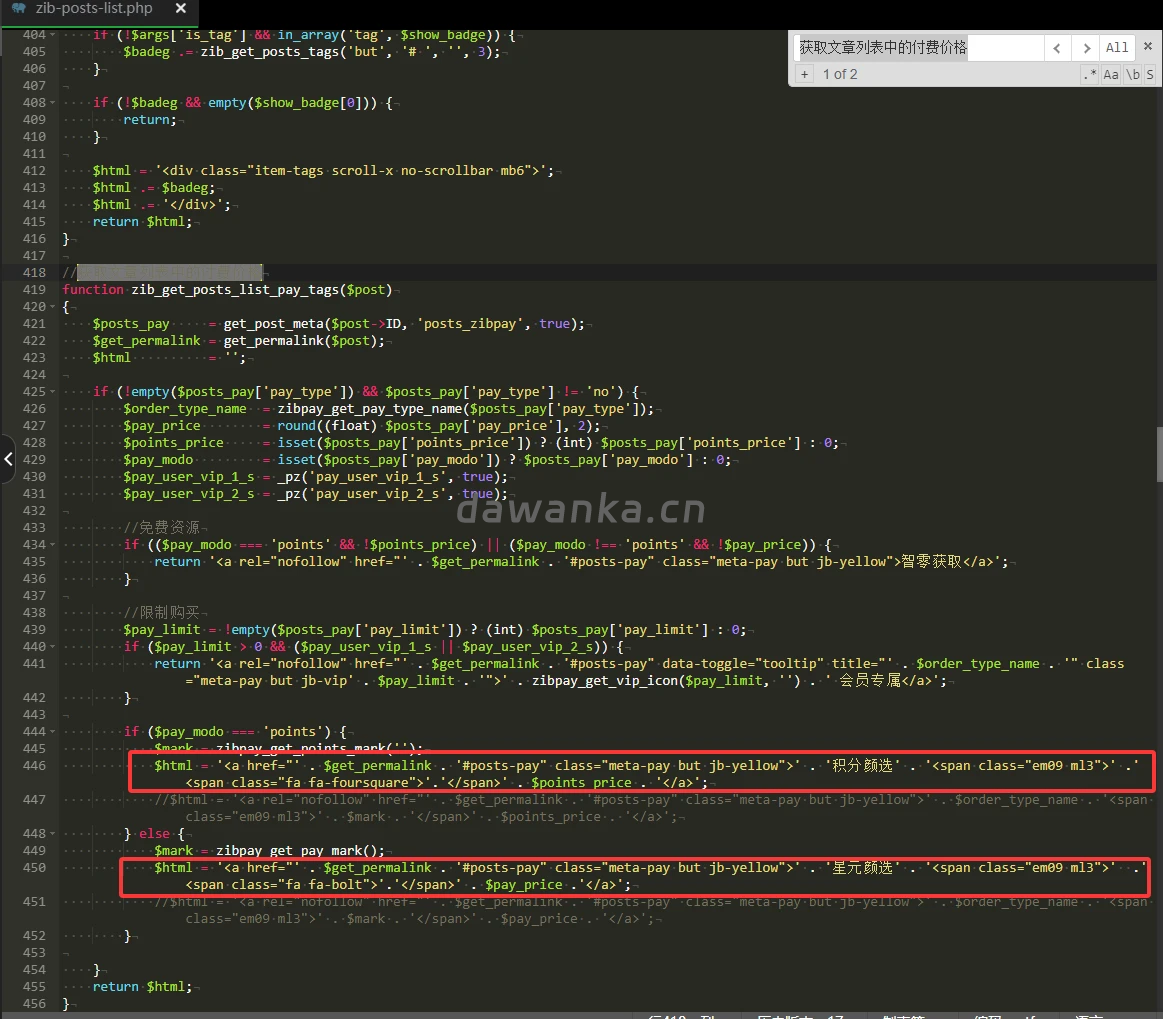
定位:/wp-content/themes/zibll/inc/functions/zib-posts-list.php文件,我们在这个文件里面搜
获取文章列表中的付费价格
找到代码
$html = '<a rel="nofollow" href="' . $get_permalink . '#posts-pay" class="meta-pay but jb-yellow">' . $order_type_name . '<span class="em09 ml3">' . $mark . '</span>' . $points_price . '</a>';替换或者注释掉下面代码
$html = '<a href="' . $get_permalink . '#posts-pay" class="meta-pay but jb-yellow">' . '积分星选' . '<span class="em09 ml3">' .'<span class="fa fa-foursquare">'.'</span>' . $points_price . '</a>';找到代码
$html = '<a rel="nofollow" href="' . $get_permalink . '#posts-pay" class="meta-pay but jb-yellow">' . $order_type_name . '<span class="em09 ml3">' . $mark . '</span>' . $pay_price . '</a>';替换或者注释掉下面代码
$html = '<a href="' . $get_permalink . '#posts-pay" class="meta-pay but jb-yellow">' . '星元严选' . '<span class="em09 ml3">' .'<span class="fa fa-bolt">'.'</span>' . $pay_price .'</a>';注释后图如下:










请登录后查看回复内容